Lyteworkgo

Field service software for the trades

You've been working hard — it's time for some Lytework.

With Lyteworkgo you can run the whole chain — from the first interaction to the final payment — giving you the professional edge your customers are looking for.

14 days free. Import your client list from a CSV on day one.

Mobile app coming soon

Easy steps
Client to payment. One record, no re-typing the address four times.
Clear prices
Every size priced on this page. No demo booking to learn a number.
Every feature, any size
From one person to sixty seats and beyond.
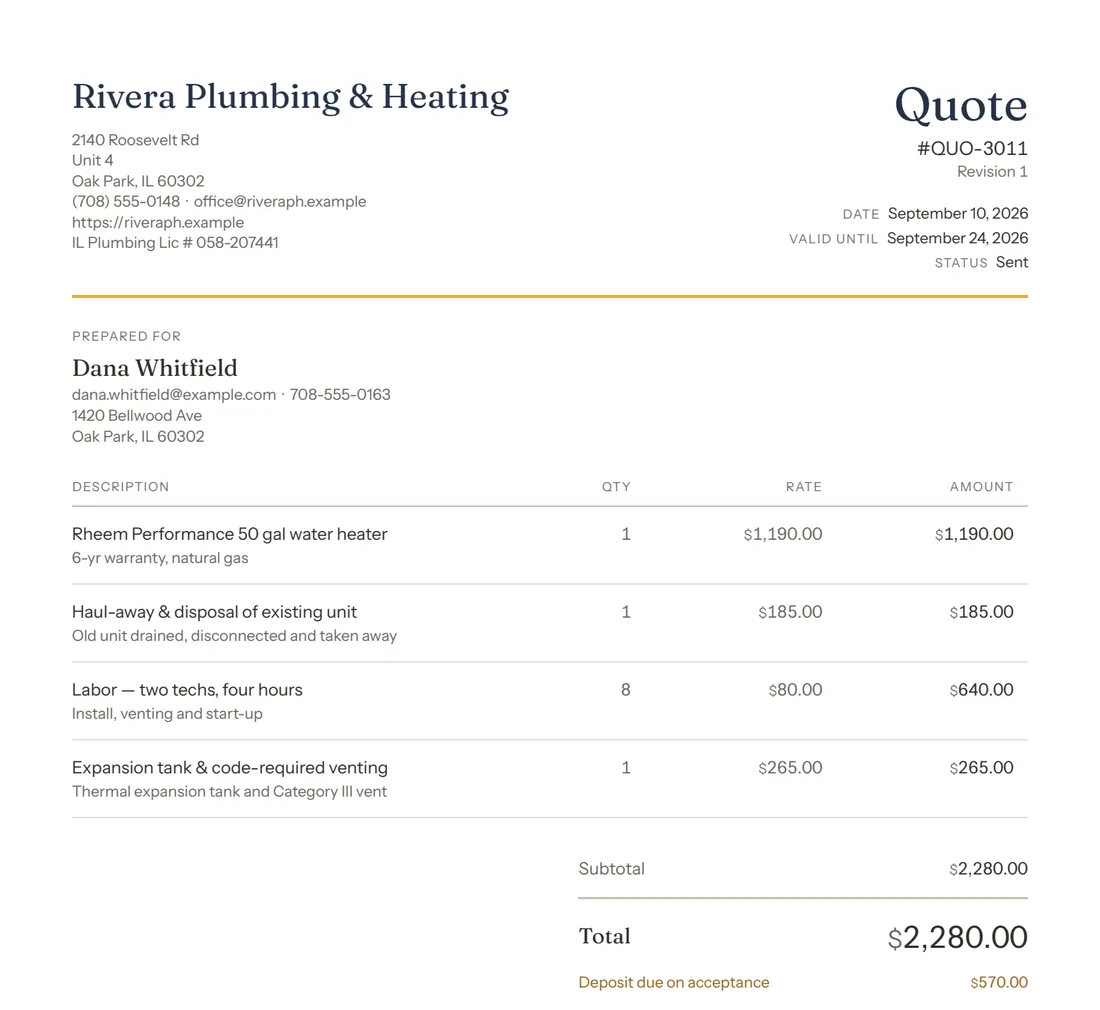
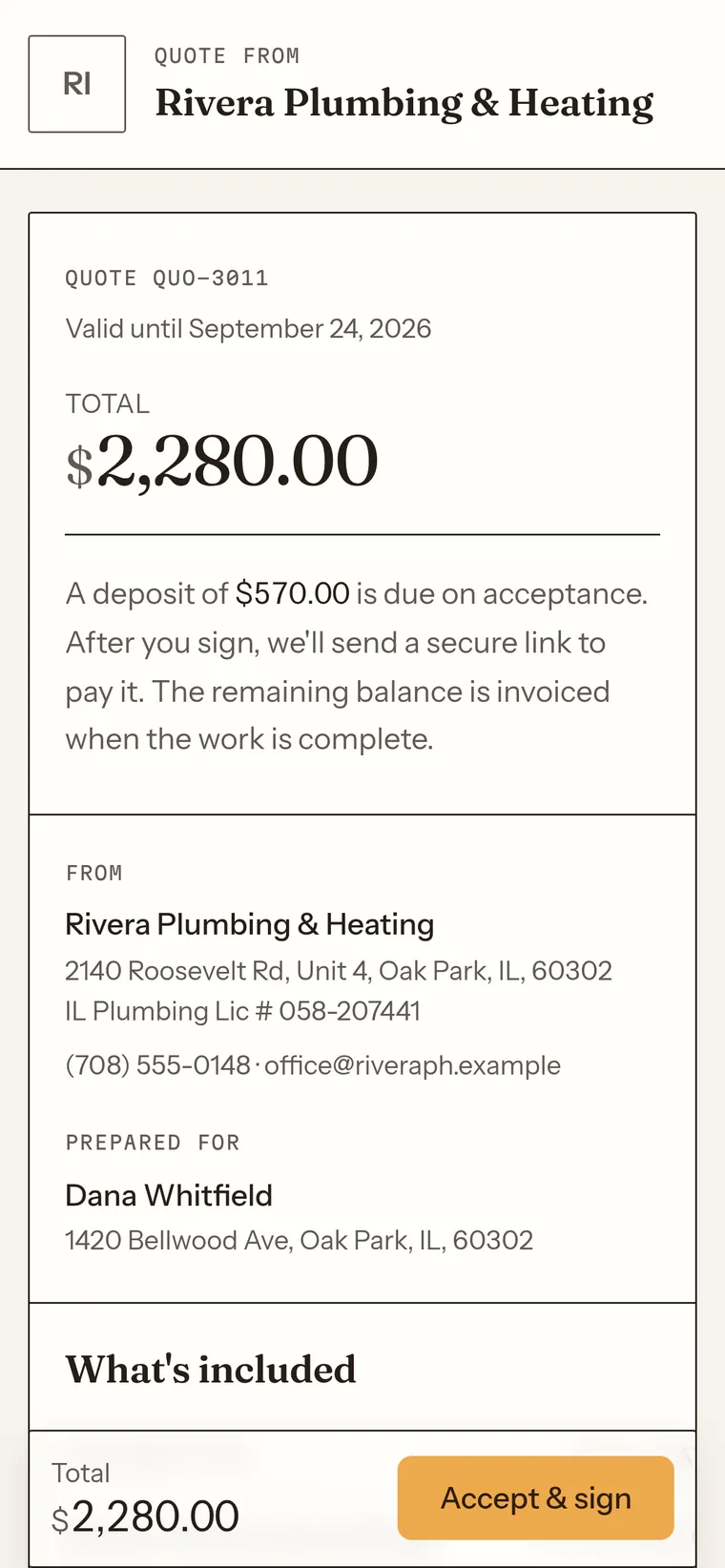
Preview of the quote PDF a customer receives by email: Rivera Plumbing & Heating letterhead with its Illinois plumbing licence, quote QUO-3011 with its date and expiry, a Prepared for block for Dana Whitfield, and the first three itemised lines of a 50-gallon water-heater replacement.The same quote open on a phone: the total, the deposit terms, who it is from and who it is for, and an Accept & sign button fixed to the bottom of the screen.
Previews, not the whole document. Screens and documents change as we ship updates.

The spine

Six records. One thread. Nothing typed twice.

Stop guessing what your next step is. Lyteworkgo makes it easy to keep track of the entire pipeline.

  1. 01

    Client

    Name, property, gate code, the dog. Service history that survives staff turnover.

    no customer artifact

  2. 02

    Request

    From a phone call you type up, or straight off the booking form on your website. It lands in one inbox either way.

    “we got it” confirmation

  3. 03

    Quote

    Line items, photos, a real total. Signed on a phone with a finger, timestamped.

    signable quote sheet

  4. 04

    Job

    Scheduled on the calendar, worked against a checklist, with hours and materials landing on the record.

    appointment reminders, 7d & 24h

  5. 05

    Invoice

    Turn on auto-drafting and closing the job starts the invoice for you, off the quote already approved. You still bill it.

    itemised invoice

  6. 06

    Payment

    Card or bank transfer from the invoice itself. Deposits before the truck rolls, if you want them.

    receipt, paid

What your customer sees

Three surfaces, photographed not drawn.

Your competitor down the road is sending a quote as a photo of a notepad, and a “thanks” text with no punctuation. These are the documents a homeowner forms an impression from — and every image below is a preview cut from a screenshot of the running product, so what you see is what they get.

Plate 01

The quote they sign

No login, no account. They draw or type a signature, and a one-time code confirms it’s them.
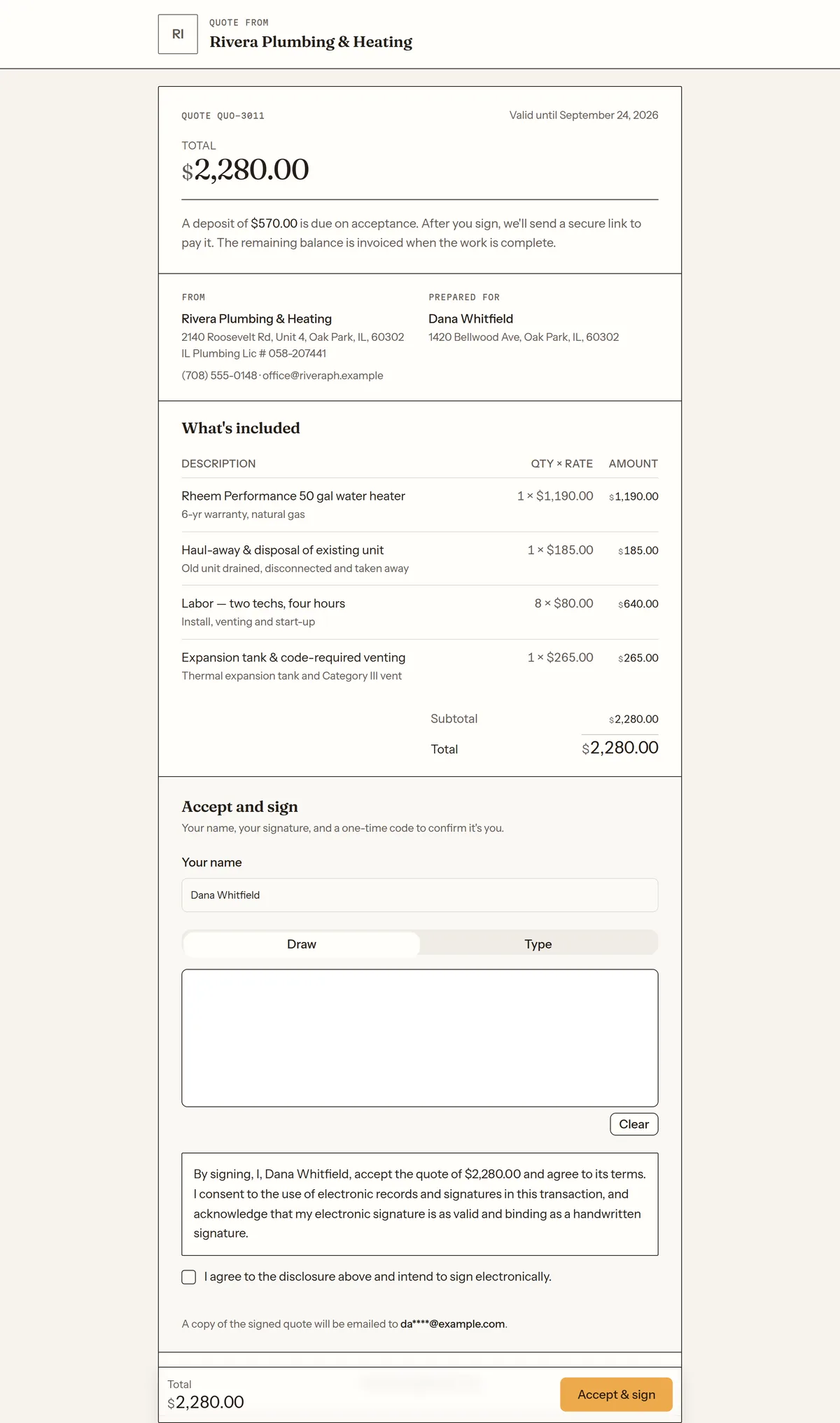
Preview of the customer’s quote page, at the signing step: an Accept and sign heading, the line “Your name, your signature, and a one-time code to confirm it’s you”, a name field already filled in, a Draw and Type toggle, and the top of an empty signature box.
Plate 02

The booking form

Embeds on your site. Asks what the job is before it asks who they are — and never promises a slot you have not agreed to.
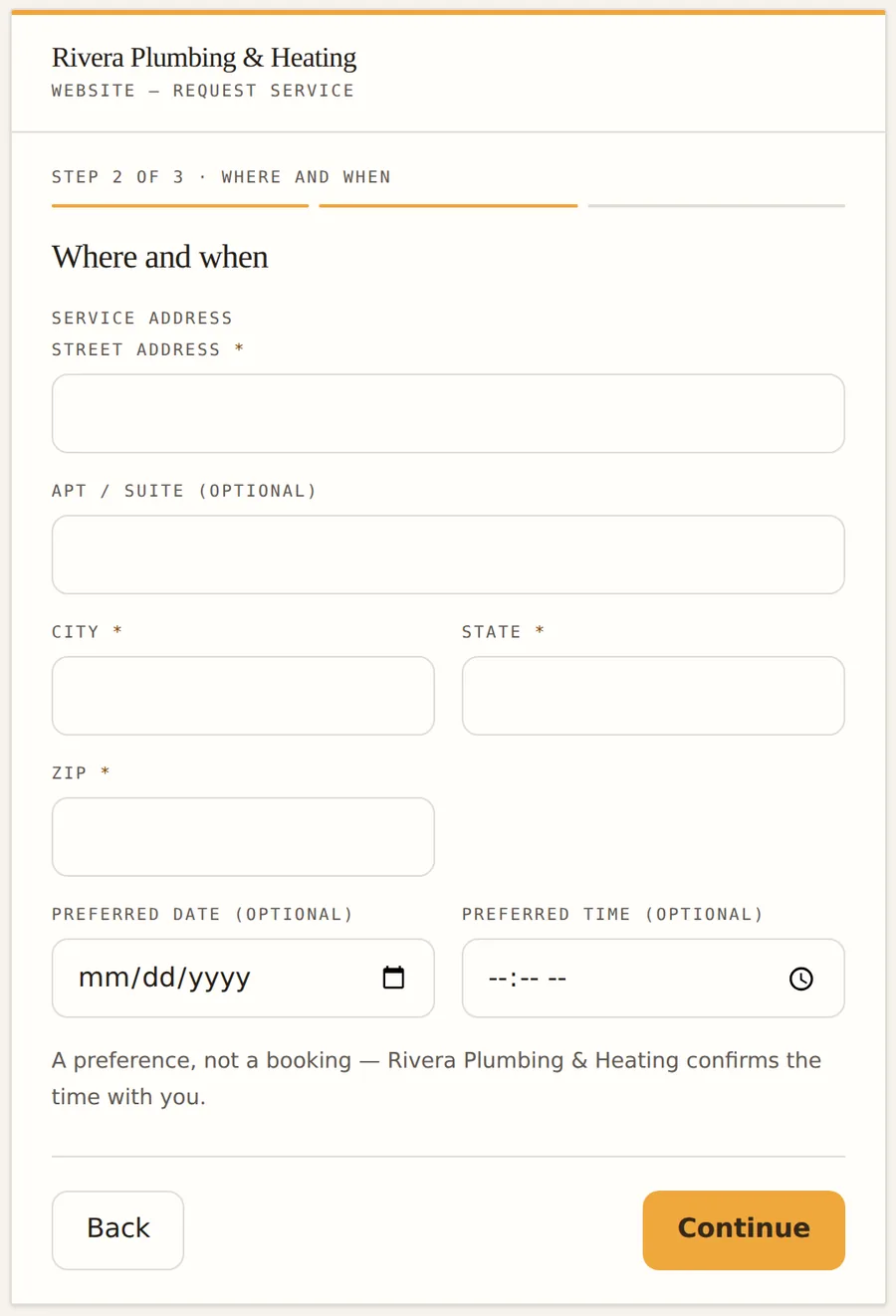
Preview of the embeddable booking form: optional preferred date and preferred time fields, a line reading “A preference, not a booking — Rivera Plumbing & Heating confirms the time with you”, and Back and Continue buttons.

The form takes a preferred time and the shop confirms it — the widget has no view of your calendar, and says so on the screen rather than implying otherwise.

Plate 03

The invoice

Itemised, in real type. The kind a customer forwards to a spouse.
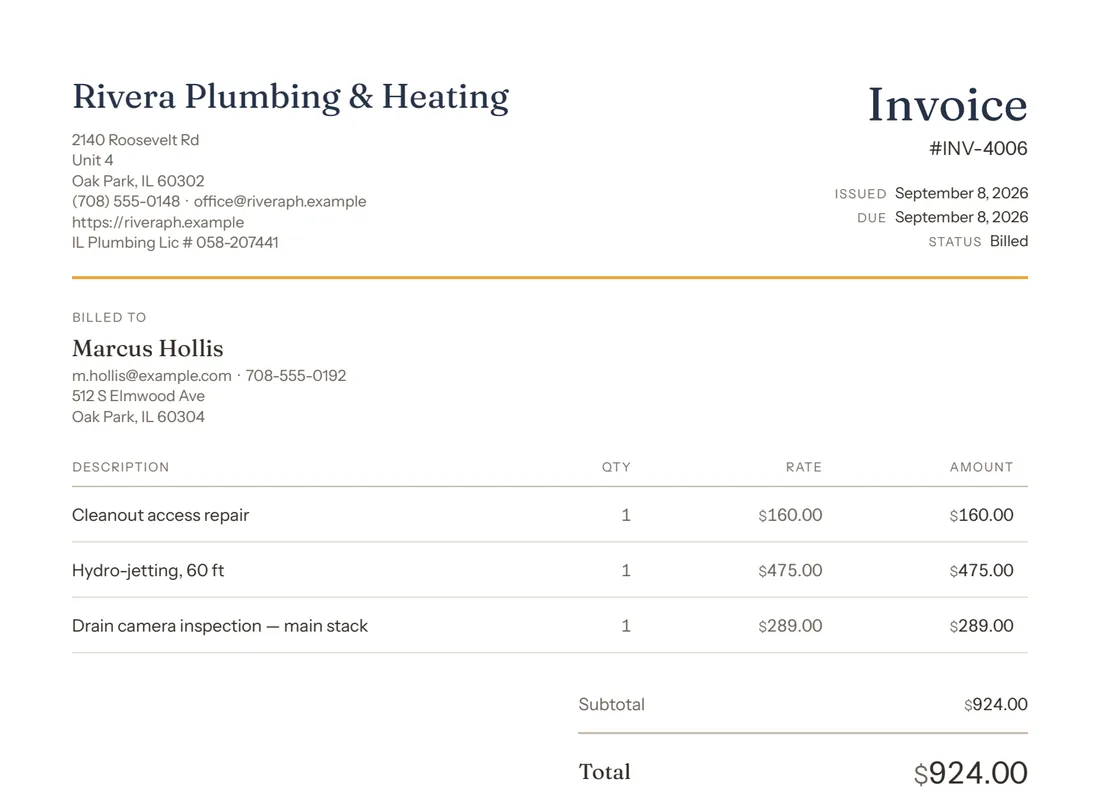
Preview of the invoice PDF: Rivera Plumbing & Heating letterhead, invoice INV-4006 in the Billed state with its issue and due dates, a Billed to block for Marcus Hollis, and the first two itemised lines, for a cleanout repair and hydro-jetting.

The part you use

And this is your side of it.

From your phone or your PC, an easy app where you don't need training to run your week.Previews, not the whole screen — the app changes as we ship. Every size includes all of it — see pricing.
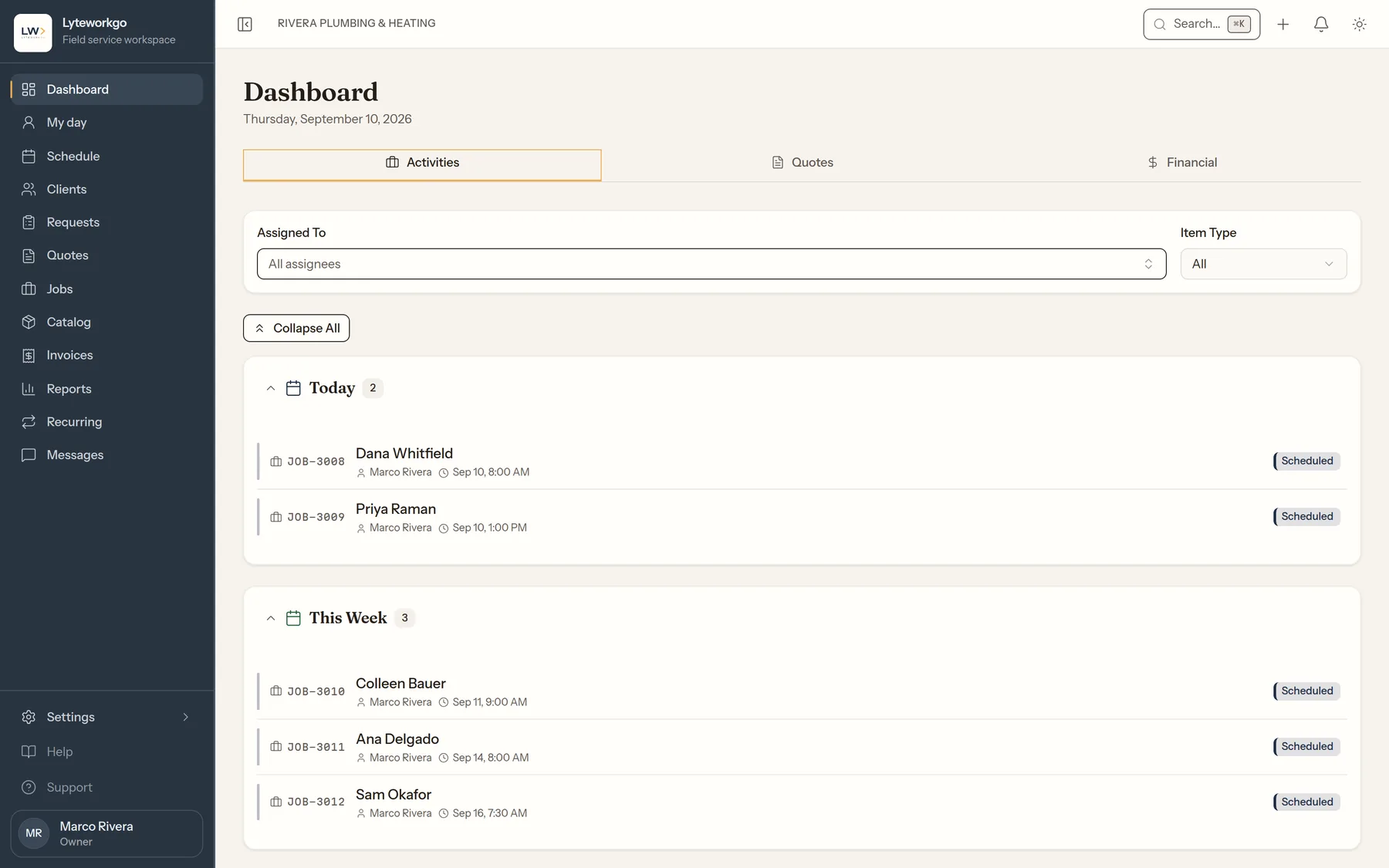
Preview of the Lyteworkgo dashboard for Rivera Plumbing & Heating on Thursday 10 September 2026: an Activities tab listing today’s two jobs, for Dana Whitfield and Priya Raman, each assigned to Marco Rivera and marked Scheduled.

The day, on one screen

Today’s jobs and who is on each one. The first thing you open.
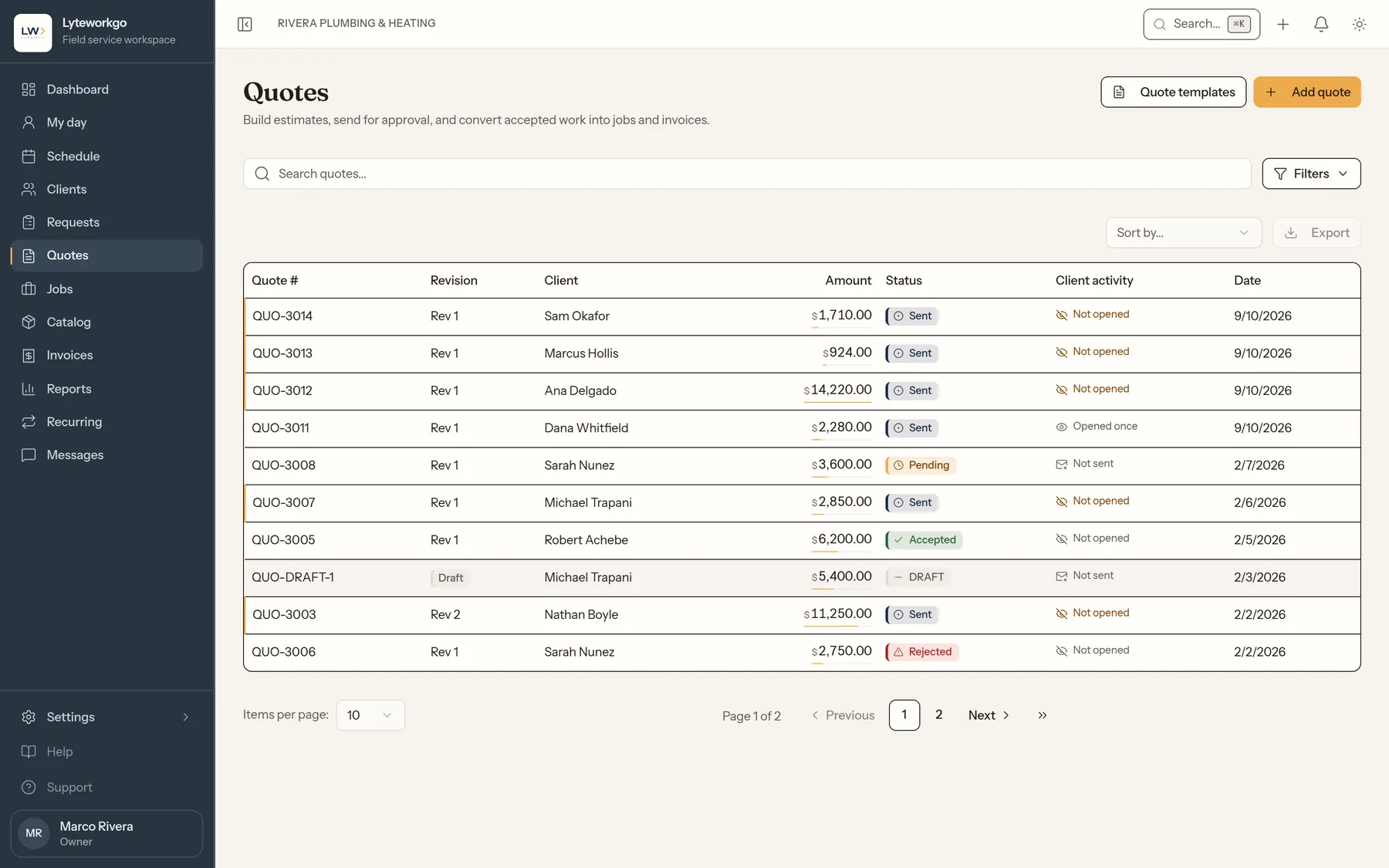
Preview of the Quotes list for Rivera Plumbing & Heating: four quotes sent on 10 September 2026 to Sam Okafor, Marcus Hollis, Ana Delgado and Dana Whitfield for $1,710.00, $924.00, $14,220.00 and $2,280.00. Three read Not opened in the Client activity column; Dana Whitfield’s reads Opened once. Below them, earlier quotes marked Pending, Sent and Accepted.

Quotes, and whether they were opened

Every quote with its revision, amount and status — plus whether the customer has actually opened it. Three of the four sent today are still unopened; one has been read. That column is what tells you who to call.
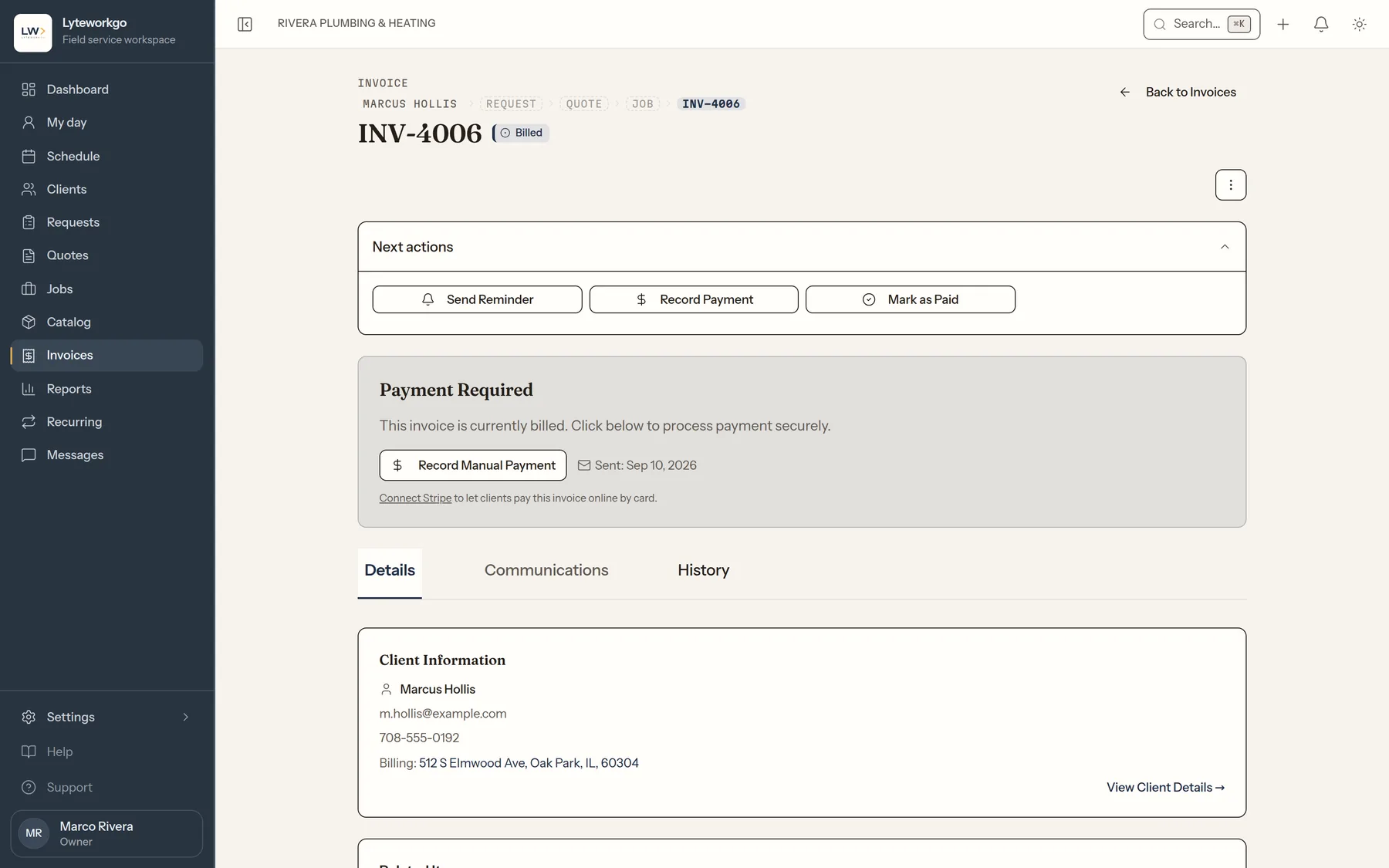
Preview of invoice INV-4006 for Marcus Hollis in the Billed state, with a Request-Quote-Job-Invoice breadcrumb, a Next actions panel offering Send Reminder, Record Payment and Mark as Paid, and the top of a Payment Required panel with a Record Manual Payment button.

An invoice, and the record behind it

The breadcrumb is the chain: request, quote, job, invoice. Send a reminder, record a payment taken by cash or check, or mark it paid.
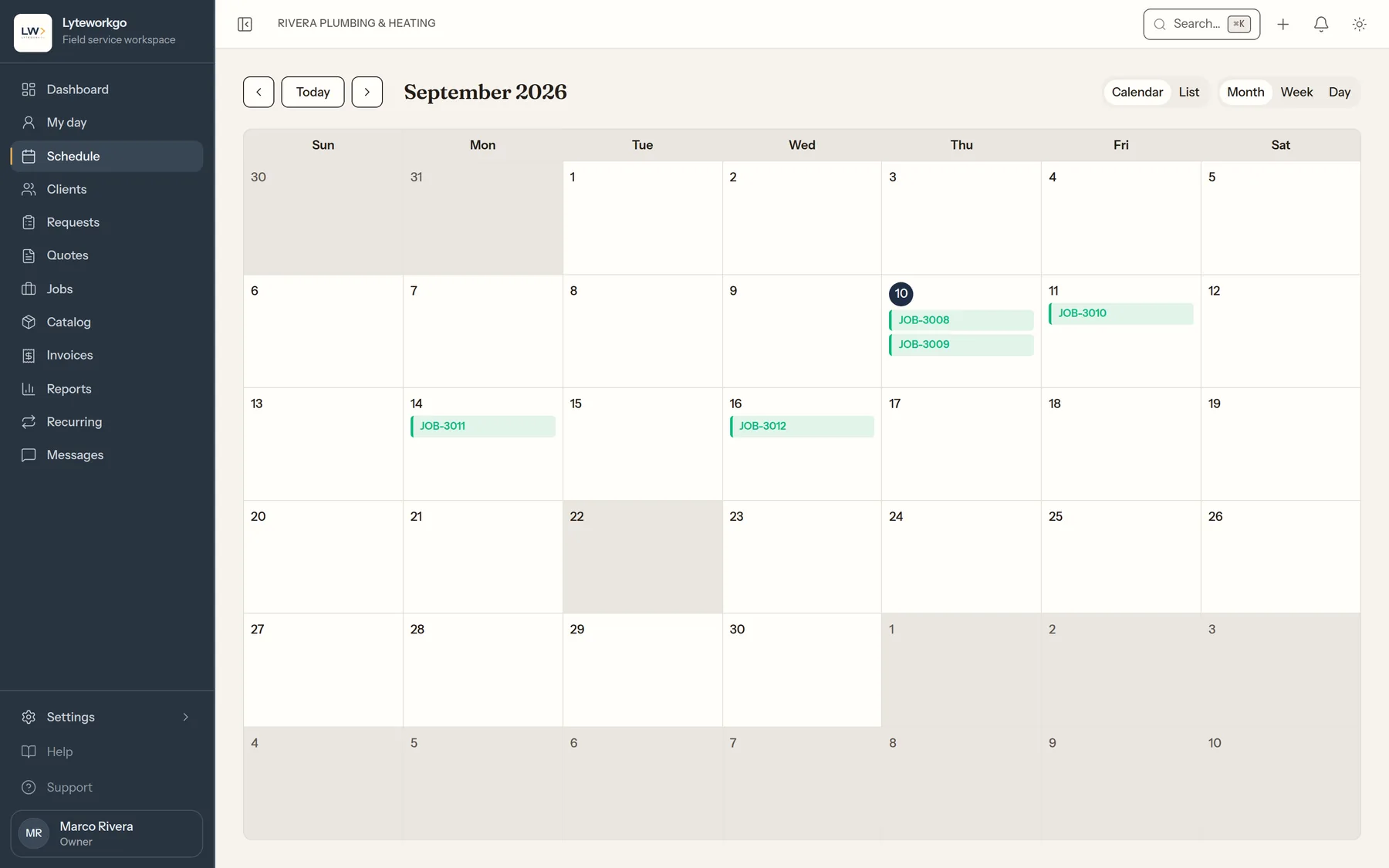
Preview of the schedule in month view for September 2026, with jobs JOB-3008 and JOB-3009 on the 10th, JOB-3010 on the 11th, JOB-3011 on the 14th and JOB-3012 on the 16th.

The month, as booked

Month, week or day. Jobs sit on the dates they are actually scheduled for — the same records as the list, drawn on a grid.

Who you pay for

Pay a full seat for the people who run the business. Helpers are half.

If someone handles your customers or your money, they’re a seat. If they just do the work, they’re half a seat.

Helpers are half a seat

Helper accounts — a helper is half a seat.

Give the people who work with you their own sign-in for half a seat. On their phone they see their own visits: where to go, when, what to do, and the checklist. They tick it off, add photos and notes, and tap Mark my visit done — and you’re told. Completing the job stays with you: a helper never can.

Helpers never see your prices, your invoices or your client list. They sign in with an email and a password, and we never text them. Solo is for one person, so helpers start at Small.

Share a job with a subcontractor — no login needed

Email an outside company a link to one job, or copy it and send it yourself. They see the address, the schedule and the work — not your prices, and not your customer’s phone number or email. They add photos and notes and tell you when they’re done, and everything they send is marked with their company’s name on the job.

The link stops working 7 days after the job closes (or 90 days after you share it, if that comes first), and you can turn it off at any time.

Pricing

Don’t overpay. Your price matches your team’s structure.

Every feature, in your size.

Find your size

Everyone who signs in is a seat. Helpers are team members that only need to know where to go and what to do — no money, no customers. A helper is half a seat.

Fine-tune: who signs in, who helps

Try a team

Card required. No charge for 14 days on any size — cancel any time before then.

Business

Coming soon

For a business running several technicians a day, where somebody is deciding who goes where.

Not available yet

Larger crews

Everything on every size, plus

  • A dispatch board — every technician’s day on one screen, with the unassigned work beside it.
  • Route optimisation that proposes who should take a job and in what order.
  • Technician profiles the board actually uses — skills and home base, on top of the working hours and time off every size already keeps — so it will not put somebody where they cannot be.
  • QuickBooks sync for customers, invoices and payments.
Notify me

We will email you when Business is ready.

If you go over your allowance

Every size includes storage and customer texts. Going over never stops your work: the extra is added to your next invoice, at the same rates on every size, and we email your owners when you cross an allowance.

Extra storage
$1per started 10 GB, a month
Extra texts
2¢per text segment
A segment is up to 160 characters (70 with an emoji). Only texts to your customers count.

Nothing is billed for going over during a free trial; customer texts pause at the allowance instead. After it, a safety brake pauses customer texts at 5× the allowance until we’ve talked, so a runaway automation can’t run up a bill.

What every size keeps

0% platform fee
We take nothing from the payments you collect. They go through your own Stripe account, and Stripe’s processing fees are paid to Stripe.
Customers and subcontractors are free
Your customers’ portal sign-ins and the job links you share never count as seats.
Price changes come with notice
We email your account’s owners at least 30 days ahead with the new prices and the date. They start with your first billing period on or after that date, never partway through one. Cancel before then and you’re never charged them.
Monthly, no contract
Every size is billed monthly. There is no yearly plan.

About these prices. Prices are per month, plus applicable tax, and are read from our billing provider when this page loads. The amount you are charged and the trial end date are shown at checkout before you enter a card.

Line by line

Every size, side by side

What changes from one size to the next: the seats, and how much storage and texting come with them.

Every size, side by side
SizeSoloSSmallMMediumLLargeXLXXL
Price
Seats included136153060
Extras allowedNoneUp to 1.5 seatsUp to 4.5 seatsUp to 8 seatsUp to 14.5 seatsNo limit
Holds at most1 person4.5 seats10.5 seats23 seats44.5 seatsNo limit
Storage10 GB30 GB60 GB150 GB300 GB600 GB
Text segments a month2506001,0002,5005,00010,000
Storage over the allowance$1 per started 10 GB a month$1 per started 10 GB a month$1 per started 10 GB a month$1 per started 10 GB a month$1 per started 10 GB a month$1 per started 10 GB a month
Texts over the allowance2¢ a segment2¢ a segment2¢ a segment2¢ a segment2¢ a segment2¢ a segment

Extras add room, not storage or texts.

  • Everyone who signs in is one seat, whatever roles they hold, and a helper is half. Invitations count from the moment they’re sent. Customers, subcontractor links and deactivated users never count.
  • Only texts to your customers count, in segments of up to 160 characters (70 with an emoji). Sign-in codes, security alerts and opt-out replies are on us.
  • Going over never stops your work. Extra storage is $1 per started 10 GB a month, and each extra text segment is 2¢, billed on your next invoice. We email the owners when you cross an allowance. A safety brake pauses customer texts at five times the allowance until we’ve talked.
  • Prices are per month, plus applicable tax.

What you get

Every feature, on every size

Sizes differ only in seats, storage and texts. Everything below is in the product today, on Solo and XXL alike.

The work itself

Clients
Every customer, their contacts and address, and the full history of what you have done for them.
Requests
Capture what someone needs before it is work, and keep it out of the calendar until you have agreed it.
Quotes
Build an estimate, send it, and let the customer sign it on their phone. Take a deposit before you start.
Jobs
Schedule the visit, work the checklist, track the hours and materials, then close it out.
Invoices
Bill the work, send it, and see what is still owed. Turn on auto-drafting and completing a job starts the invoice for you.

Helpers and subcontractors

Helper accounts
Sign-ins for the people who only do the work, at half a seat each. They see their own visits — where to go, when, and what to do — tick the checklist, add photos and notes, and tell you when they’re done. They never see prices, invoices or your client list, and completing the job stays with you. Solo is for one person, so helpers start at Small.
Subcontractor links
Share a job with a subcontractor — no login needed. They open that one job from a link, see the address, the schedule and the work (never your prices or your customer’s contact details), add photos and notes, and tell you when they’re done. The link stops working 7 days after the job closes (or 90 days after you share it, if that comes first), and you can turn it off at any time.

Getting paid

Online payments
Card and bank payments through your own Stripe account. Cash and checks are recorded in the same place.

Winning work

Review requests
Ask for a review automatically once the job is done.
Booking widgets
A form you embed on your own website — what visitors submit arrives as a request. Up to five, so a second trade or a campaign page can have its own.

Staying in touch

Email notifications
Your customer is emailed at each step — plus the ones that send themselves: appointment reminders, quote follow-ups and expiry warnings out of the box, and invoice due and overdue notices when you turn them on.
SMS notifications
Send the same updates by text, within your size’s monthly text allowance. Consent and opt-outs are captured and handled for you.
Email templates
Rewrite the emails your customers receive in your own words. Text-message wording stays standard.
Customer portal
A site of your own where customers check status, sign quotes, pay invoices and message you — with no password to remember.

Repeat business

Recurring services
Standing plans that create the jobs for you — weekly, every few weeks, or monthly.

Running the business

Standard reports
Revenue, what you are owed, and how much of what you quote turns into work. On screen or exported.
Client value reporting
Client value reporting — which customers are actually worth having, by revenue over time.
Staff roles
Office staff, Field tech and Billing roles, each person with their own sign-in. One person can hold more than one, and each role starts with the access that job needs — adjust it per person with switches. Office staff don’t see your costs or invoices unless you turn that on, and none of them can change your settings. Solo is for one person, so inviting anyone starts at Small.
Inventory
Count what you carry, set a level to reorder at so low parts flag themselves in the list, and let finished jobs draw the shelf down for you.
Stock locations
A place for each vehicle and each warehouse, counted separately, so a job takes its parts off the vehicle that carried them. Move stock between them without the total changing.

Before you ask

Questions, answered plainly

Do I need a credit card to start the free trial?
Yes. You enter a card when you sign up, but nothing is charged for 14 days — we email you before the trial ends, and you can cancel any time before then without being billed. Taking the card up front is what lets your account carry straight on afterwards instead of locking you out mid-job.
What happens when the trial ends?
Your card is charged for the size you chose, plus any extras, and everything continues exactly as it is — same clients, quotes and jobs, nothing to re-do. Cancel before the trial ends and you are not charged at all. There is one free trial per account, and per card: a card that has already had a free trial starts a paid subscription instead, and we tell you before anything is charged.
How do I pick a size?
Count everyone who signs in, you included, and your helpers. A helper is half a seat. The calculator above shows the cheapest size that fits and what it costs each month. You can change size whenever you like.
Can I change size later?
Yes, from Account & billing; the owners and anyone they make an authorized manager can. Moving up takes effect at once, and the difference for the rest of the month is added to your next invoice. Moving down lowers your next invoice and needs your team to fit the smaller size. We never change your size for you, and removing someone never changes your bill by itself.
What happens when my team outgrows its size?
When your size is full you can add an extra seat or helper (on every size but Solo), until the next size would cost the same. Past that point, adding someone means moving up. Extras are added to your next invoice from the day you add them.
Do the people on my crew need a seat?
If they only do the work, add them as helpers: each is half a seat. A helper signs in with an email and password and sees only their own visits: where to go, when, what to do and the checklist. They add photos and notes and tell you when they’re done; you complete the job. Helpers never see prices, invoices or your client list. Anyone who deals with customers or money — quoting, invoicing, taking payment, running the office — is a full seat. Solo is for one person, so helpers start at Small.
Can I send a job to a subcontractor?
Yes, on every size, with no login and no seat. Share the job and they get a link to that one job, by email or however you send it. They see the address, the schedule and the work — not your prices, and not your customer’s phone number or email — and they can add photos and notes and tell you when they’re done. The link stops working 7 days after the job closes (or 90 days after you share it, if that comes first), and you can turn it off at any time.
Do you take a cut of my payments?
No. There is no platform fee. Payments go through your own Stripe account, which we help you set up; Stripe’s processing fees are paid to Stripe. Gonzware LLC is not affiliated with Stripe.
Is anything held back on the smaller sizes?
No. Every size has every feature on this page. Sizes differ only in seats, storage and text segments.
What if we go over our storage or texts?
Going over never stops your work. Extra storage is $1 per started 10 GB a month, and each extra text segment is 2¢, billed on your next invoice. We email the owners when you cross an allowance. A safety brake pauses customer texts at five times the allowance until we’ve talked. Only texts to your customers count, in segments of up to 160 characters (70 with an emoji). Sign-in codes, security alerts and opt-out replies are on us.
Will my price go up?
It can. We email your account’s owners at least 30 days before a price change, with the new prices and the date they take effect. A change can cover sizes, extras or the usage rates. New prices start with your first billing period that begins on or after that date, never partway through one. If you don’t want them, cancel before that billing period starts and you won’t be charged them. A size or extras you choose yourself is charged at the price shown before you confirm.
What is Business, and can I buy it?
Not yet — that is what "coming soon" means on the card. Business is for a business running several technicians a day, where somebody is deciding who goes where: a dispatch board, route optimisation, technician profiles the board schedules around, and QuickBooks sync. There is no price and no signup for it today. Tell us you want it and we will email you when it is ready; there is no card and nothing to cancel in the meantime.
Is there a mobile app?
Not yet — an app for iPhone and Android is coming soon, and it will come with every size, with nothing extra to buy. Today Lyteworkgo runs in your phone’s browser, so your technicians can see their day and the jobs on it from the truck.
Is my customer data secure?
Production data is isolated per workspace with modern authentication. Card data never touches our servers — Stripe handles payment details.

Talk to us

A real person answers this.

Tell us what you run and what is going wrong with how you run it. No demo booking, no discovery call unless you want one.

We'll use your details only to respond to your message; we won't add you to a mailing list. See our Privacy Policy.